# Soroban Flashcard Generator A vector-based PDF flashcard generator for learning soroban (Japanese abacus) numbers. Creates double-sided flashcards with soroban bead representations on the front and Arabic numerals on the back. ## Examples
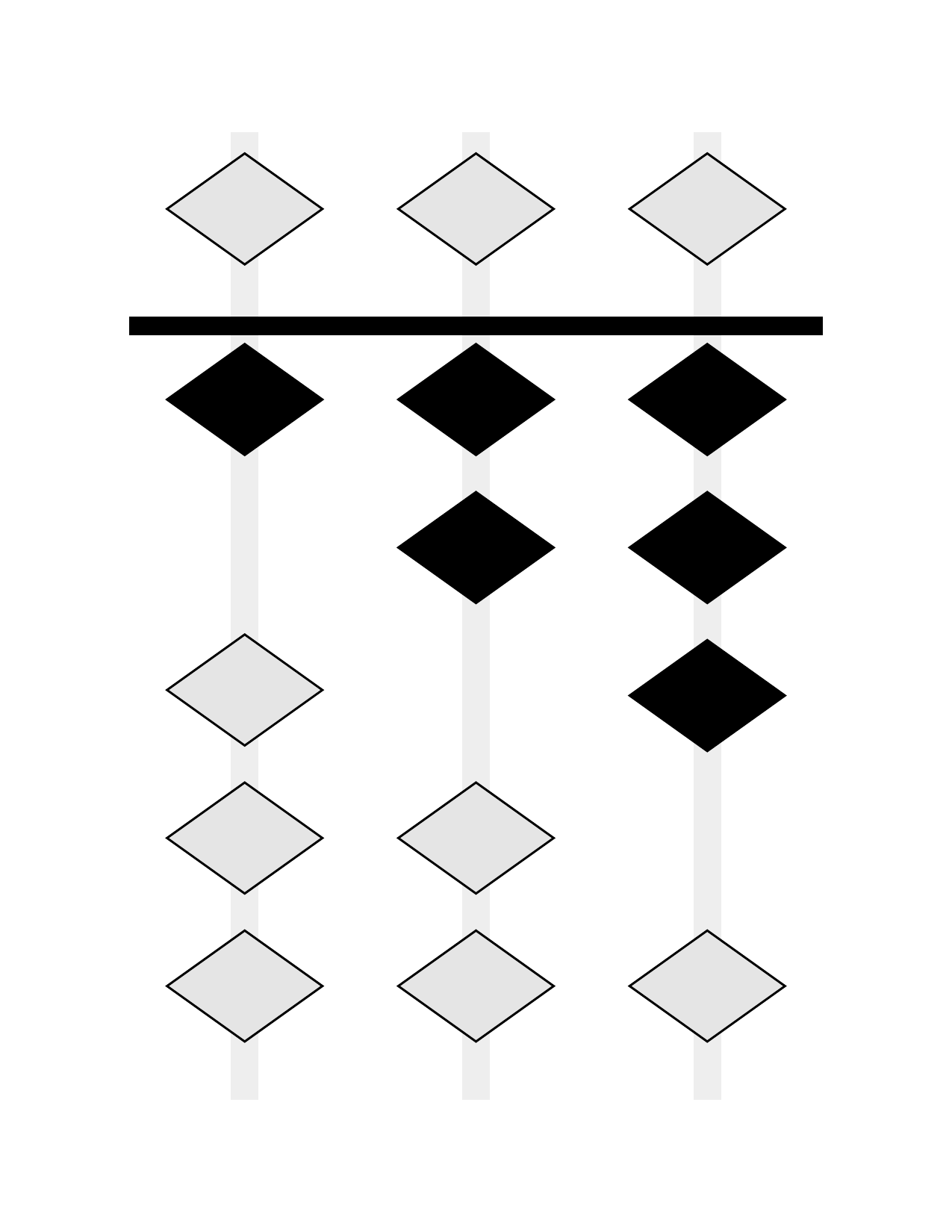
Soroban showing 123
Soroban (Front)
Numeral 123
Numeral (Back)
Place-value colored 456
Place-Value Colors
Colored numeral 456
Colored Numerals
### Bead Shapes
Diamond beads
Diamond (Realistic)
Circle beads
Circle (Traditional)
Square beads
Square
### Layouts and Options
6 cards per page
6 Cards Per Page
12 cards per page
12 Cards Per Page
Counting by 5s
Skip Counting by 5s
Hidden inactive beads
Hidden Inactive Beads
### Printing Features
Cutting guides
Cutting Guides
Full-page guides for accurate card separation
Cutting and registration marks
With Registration Marks
Alignment marks for duplex printing verification
## Features - 🎯 **Pure vector graphics** - All soroban diagrams and text are rendered as vectors - 📏 **Configurable layouts** - 1 to 30+ cards per page with automatic scaling - 🖨️ **Duplex printing ready** - Automatic front/back alignment for double-sided printing - 🔤 **Embedded fonts** - Bundled DejaVu Sans for consistent output - 🔢 **Flexible number ranges** - Generate cards for any range or custom list - 🎨 **Color schemes** - Educational colors for place-value, heaven-earth, alternating - 🌈 **Colored numerals** - Match numeral colors to bead colors - ✂️ **Cutting guides** - Full-page guides for accurate card separation - 🔷 **Customizable beads** - Diamond (realistic), circle, or square shapes - 📈 **Skip counting** - Count by 2s, 5s, 10s, or any increment - 🔀 **Hide inactive beads** - Cleaner display for beginners - 📦 **Node.js/TypeScript integration** - Clean function interface for web apps ## Quick Start ### Prerequisites - macOS (tested on latest versions) - Python 3 (included with macOS) - Typst (PDF generation engine) - qpdf (optional, for linearization) ### Installation ```bash # Install dependencies make install # Or manually: brew install typst qpdf pip3 install pyyaml ``` ### Generate Flashcards ```bash # Generate default set (0-9) make # Generate from config file python3 src/generate.py --config config/0-99.yaml # Custom range python3 src/generate.py --range 0-99 # Custom list of numbers python3 src/generate.py --range "1,2,5,10,20,50,100" # With shuffle python3 src/generate.py --range 0-99 --shuffle --seed 42 ``` ## Configuration ### Using Configuration Files Create a YAML or JSON file with your preferences: ```yaml range: "0-99" cards_per_page: 6 paper_size: "us-letter" orientation: "portrait" margins: top: "0.5in" bottom: "0.5in" left: "0.5in" right: "0.5in" gutter: "5mm" show_cut_marks: true show_registration: true font_family: "DejaVu Sans" font_size: "48pt" columns: auto show_empty_columns: false shuffle: false seed: 42 # For deterministic shuffling ``` ### Command-Line Options ```bash python3 src/generate.py [OPTIONS] Options: --config, -c FILE Configuration file (JSON or YAML) --range, -r RANGE Number range (e.g., "0-99") or list (e.g., "1,2,5") --step, -s N Step/increment for ranges (e.g., 2 for even numbers) --cards-per-page N Cards per page (default: 6, supports 1-30+) --paper-size SIZE Paper size (default: us-letter) --orientation ORIENT Page orientation (portrait/landscape) --margins T,R,B,L Margins (e.g., "0.5in,0.5in,0.5in,0.5in") --gutter SIZE Space between cards (default: 5mm) --shuffle Shuffle the numbers --seed N Random seed for deterministic shuffle --cut-marks Show cut marks --registration Show registration marks for alignment --font-family FONT Font family (default: DejaVu Sans) --font-size SIZE Font size (default: 48pt, auto-scales) --columns N Soroban columns (auto or number) --show-empty-columns Show leading empty columns --hide-inactive-beads Hide inactive beads (show only active) --bead-shape SHAPE Bead shape (diamond/circle/square) --color-scheme SCHEME Color scheme (monochrome/place-value/heaven-earth/alternating) --colored-numerals Color numerals to match bead colors --scale-factor N Manual scale adjustment (0.1-1.0, default: 0.9) --output, -o FILE Output PDF path (default: out/flashcards.pdf) --linearize Create linearized PDF (default: true) ``` ## Soroban Representation The soroban is rendered with: - **1 heaven bead** (worth 5) per column - **4 earth beads** (worth 1 each) per column - **Active beads** shown in black, moved toward the reckoning bar - **Inactive beads** shown in light gray, away from the bar - **Columns** represent place values (ones, tens, hundreds, etc.) ### Column Display Options - `columns: auto` - Shows minimal columns needed - `columns: 3` - Always shows 3 columns (e.g., for 0-999) - `show_empty_columns: true` - Shows leading zeros - `show_empty_columns: false` - Suppresses leading zeros ## Print Settings ### For Best Results 1. **Paper**: US Letter (8.5" × 11") or A4 2. **Margins**: Default 0.5" works with most printers 3. **Duplex**: Long-edge binding, automatic duplex 4. **Cut marks**: Enable with `--cut-marks` for easier cutting 5. **Registration**: Enable with `--registration` for alignment verification ### Duplex Printing The PDFs are specifically formatted for double-sided printing: - **Odd pages (1, 3, 5...)**: Soroban bead diagrams (front of cards) - **Even pages (2, 4, 6...)**: Arabic numerals (back of cards) - Pages are properly ordered for **long-edge binding** (standard duplex) - Back sides are horizontally mirrored to align correctly when flipped To print double-sided: 1. Open the PDF in your viewer 2. Select Print → Two-Sided → Long-Edge Binding 3. The printer will automatically place numerals on the back of each soroban diagram ### Sample Configurations - `config/default.yaml` - Basic 0-9 set - `config/0-99.yaml` - Two-digit numbers with cut marks - `config/3-column-fixed.yaml` - Three-digit numbers, fixed width - `config/minimal-beads.yaml` - Hide inactive beads for clarity - `config/circle-beads.yaml` - Traditional circular beads - `config/place-value-colors.yaml` - Place value color coding - `config/colored-numerals.yaml` - Colored numerals matching beads - `config/count-by-5s.yaml` - Skip counting by 5s ## Project Structure ``` soroban-abacus-flashcards/ ├── src/ │ ├── generate.py # Main CLI tool │ ├── bridge.py # Node.js integration bridge │ └── api.py # FastAPI server (optional) ├── templates/ │ └── flashcards.typ # Typst template with soroban rendering ├── config/ # Preset configurations │ ├── default.yaml │ ├── 0-99.yaml │ ├── place-value-colors.yaml │ └── ... ├── client/ # Integration libraries │ ├── node/ # Node.js/TypeScript wrapper │ ├── typescript/ # Browser TypeScript client │ └── browser/ # Browser-based implementation ├── fonts/ │ ├── DejaVuSans.ttf # Bundled font │ └── DejaVuSans-Bold.ttf # Bold variant ├── out/ # Generated PDFs (created on first run) ├── Makefile # Build automation └── README.md # This file ``` ## Design Notes ### Soroban Number Mapping Numbers are decomposed into heaven (5s) and earth (1s) beads: - **7** = 1 heaven bead (5) + 2 earth beads (2×1) - **23** = Tens: 4 earth beads (4×1), Ones: 3 earth beads (3×1) - **156** = Hundreds: 1 heaven + 0 earth, Tens: 1 heaven + 0 earth, Ones: 1 heaven + 1 earth ### Duplex Alignment - Front cards are laid out left-to-right, top-to-bottom - Back cards are mirrored horizontally for long-edge binding - Registration marks (optional) help verify alignment - Safe margins ensure content isn't lost when cutting ### Vector Graphics All elements are rendered as vectors using Typst's drawing primitives: - Beads are vector circles with stroke - Rods and reckoning bar are vector rectangles - No rasterization ensures crisp output at any scale ## Troubleshooting ### "typst command not found" Run `make install` or `brew install typst` ### "qpdf command not found" PDF will generate but won't be linearized. Install with `brew install qpdf` ### Fonts not embedding Ensure the `fonts/` directory contains the DejaVu TTF files ### Misaligned duplex printing - Check printer duplex settings (should be long-edge) - Enable registration marks with `--registration` - Verify margins match your printer's capabilities ## Examples ```bash # Generate samples make samples # Quick test make test # Clean all outputs make clean # Show help make help ``` ## Node.js/TypeScript Integration ### Installation ```bash cd client/node npm install ``` ### Usage Example ```typescript import { SorobanGenerator } from './soroban-generator-bridge'; async function generateFlashcards() { const generator = new SorobanGenerator(); // Generate with clean function interface - no CLI args! const result = await generator.generate({ range: '0-99', cardsPerPage: 6, colorScheme: 'place-value', coloredNumerals: true, showCutMarks: true }); // Get PDF as Buffer const pdfBuffer = Buffer.from(result.pdf, 'base64'); // Save to file or send to client await fs.writeFile('flashcards.pdf', pdfBuffer); } ``` ### Express.js Integration ```typescript import express from 'express'; import { SorobanGenerator } from './soroban-generator-bridge'; const app = express(); const generator = new SorobanGenerator(); app.post('/api/flashcards', async (req, res) => { // Direct function call - no shell commands! const result = await generator.generate(req.body); const pdfBuffer = Buffer.from(result.pdf, 'base64'); res.contentType('application/pdf'); res.send(pdfBuffer); }); ``` ### API Reference The `SorobanGenerator` class provides: - `generate(config)` - Returns `{ pdf: string, count: number, numbers: number[] }` - `generateBuffer(config)` - Returns PDF as Node.js Buffer - `initialize()` - Start persistent Python process for better performance - `close()` - Clean up Python process All methods use clean TypeScript interfaces with proper types - no shell command building required! ## Development ### Updating Example Images If you make changes that affect the visual output, please update the example images: ```bash # Regenerate all example images make examples # Or use the update script ./scripts/update-examples.sh # Verify examples are up to date (CI will also check this) make verify-examples ``` The CI pipeline will automatically verify that example images are up to date with the code. ### Running Tests ```bash # Quick test build make test # Generate all samples make samples # Full CI verification make verify-examples ``` ## License MIT License - see LICENSE file for details. This project uses DejaVu Sans font (included), which is released under a free license.